About Clash Max

How Clash Max Works

Read the timeline, understand the tradeoffs, and know why the plan picked what it picked.

Clash Max plans forward from the export you pasted, not backward from a fantasy wish list. It starts with your live timers, uses the hours when you can realistically check in, filters out anything illegal, and compares full schedules so the top plan feels like something a real player could actually follow.

What You Do

Paste once, then read the plan the same way you would use it in-game

The About page should answer the questions players actually have after seeing the planner: what am I looking at, why is there a gap, why is Town Hall missing, and what makes this better than just upgrading the most expensive thing next.

1
Clash of Clans export screen showing the copy button

Paste your export

Clash Max reads the state you already have, including active builders, active research, hero upgrades, builder count, storages, and the export timestamp.

2
Builder artwork used to represent scheduling

Set your routine

Sleep window, check interval, wiggle room, hero policy, preset, and planning horizon all shape the result before the next upgrade is chosen.

3
Town Hall icon used to represent schedule warnings

Follow the timeline

You get builder lanes, a lab lane, stat cards, warnings, and blocker cards that explain what is ready now and what is still gated.
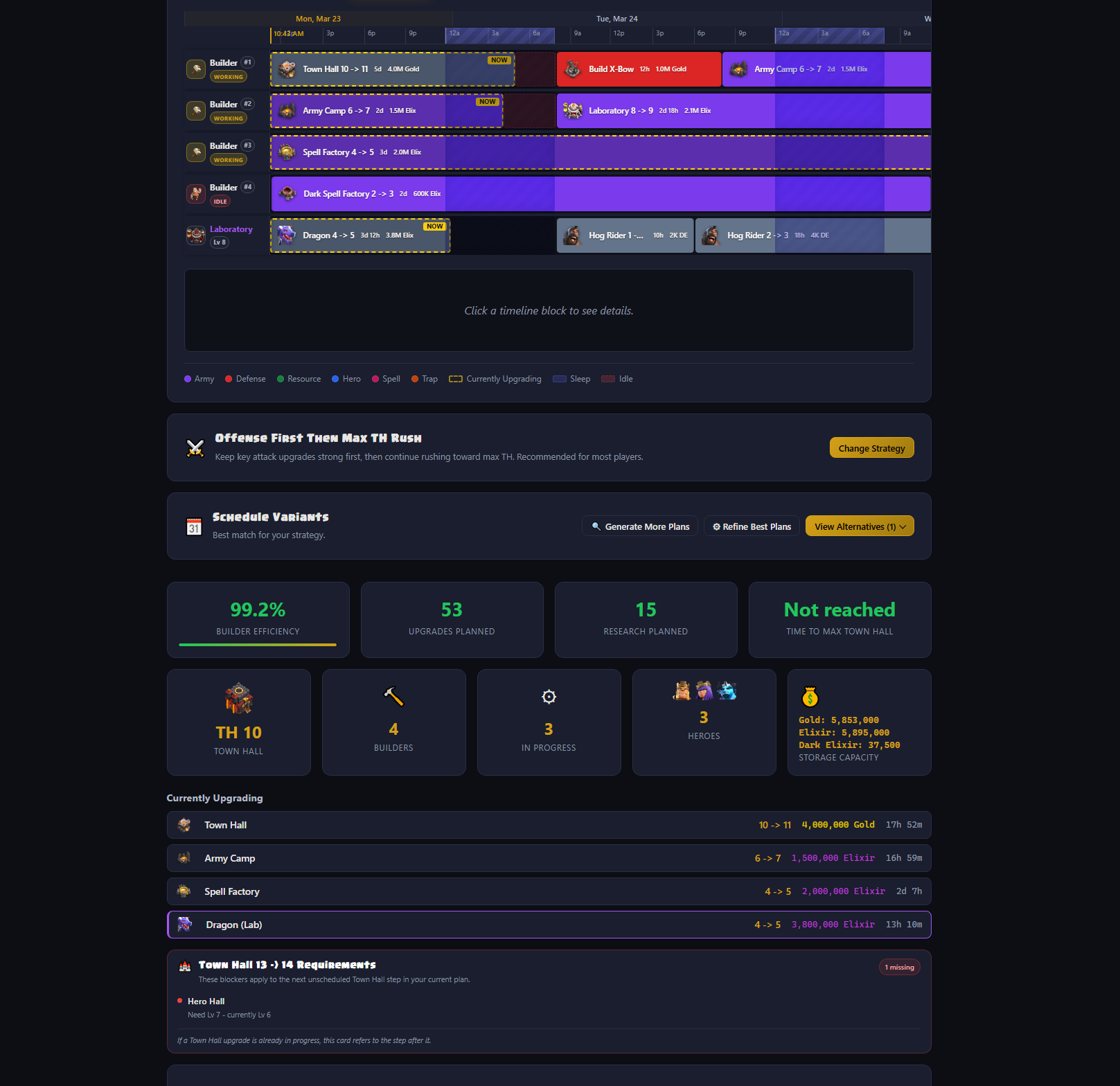
Real Clash Max Home Village planner output showing builder lanes, the lab lane, stat cards, and Town Hall warnings 1 2 3 4 5 6 7
This screenshot is from the current Clash Max build. The numbered pins match the legend beside it.
Clash of Clans export screen used to copy village data
Import And Starting State

Clash Max starts from the export timestamp, not from zero

If the export says a builder is already upgrading Town Hall with time remaining, the planner seeds that work first and continues from there. It does the same for research, hero upgrades, and other active timers.

  • If a timer exists, lvl is treated as your current completed level and the upgrade in progress is to the next level.
  • Existing building, hero, and lab timers become the starting line for the schedule you see.
  • Walls are recognized in the import but intentionally left out of timed builder scheduling because they do not consume a builder lane.
Privacy

Your export stays on this device by default

Plan generation runs in the browser. There is no scheduler backend receiving your pasted village export. The app can save your settings, cached upgrade data, last export, and selected plan locally in browser storage so the next visit is faster and less repetitive.

  • Nothing is shared unless you deliberately copy a link, copy data, or submit feedback yourself.
  • Static data and icon files are fetched so the app has current game information, but the planning work stays client-side.
  • If you clear browser storage, those saved settings and cached exports disappear from that browser.
Quick Answers

Start here if you came because the plan surprised you

Why is there a gap in my timeline?

Usually because the builder freed up while you were asleep, between check-ins, or inside your wiggle buffer. A blank overnight lane is often the correct answer, not a bug.

Which preset should I pick?

Offense First Rush is the best default for most active players. Fastest Max TH is for climbing Town Hall as fast as possible. Max Before TH is for players who want to clean up their current hall before moving on.

Why is Town Hall missing from my next steps?

Either your preset is pulling offense ahead first, Town Hall is still blocked by requirements, or the current horizon is too short to care about the next hall step yet. The warning card near the top of the timeline tells you which one it is.

Why did offense beat defense here?

Because presets rank army-support buildings and offense differently. In Offense First Rush, army camps, barracks, lab, clan castle, and spell factories can beat a defense if both are legal at the same decision time. Defense upgrades are still scheduled too, but they sit in a lower tier and usually wait until the stronger army buckets are covered first.

Why is the lab waiting?

The lab can stay open on purpose if a better research choice is about to unlock. For example, if a higher-priority troop needs Laboratory level 9 and that lab upgrade finishes in two days, Clash Max can wait instead of spending four days on a lower-priority detour first.

Sleep + Wiggle

Sleep-aware timing is what makes Clash Max feel different from a normal upgrade sorter

The planner does not assume you log in the instant a timer ends. It turns your sleep window, next realistic check-in time, and wiggle room into real scheduling rules before it chooses what comes next.

Sleep Example

If a builder finishes at 3:12 AM, Clash Max does not pretend you tapped at 3:12 AM

Home Village scheduling runs forward from the export timestamp. When a lane becomes free, the planner moves the decision to the next time a real player could reasonably act, then chooses from the upgrades that are still legal there.

Builder finishes 3:12 AM
Sleep ends 7:00 AM
Wiggle buffer +10 min
Next action time 7:10 AM
  • The timeline shows that overnight wait instead of hiding it.
  • That is why a blank band overnight can be the smartest possible plan.
  • A slightly longer upgrade can beat a shorter one if it lands closer to your next real check-in.
Wiggle Room

Wiggle room is the buffer that keeps the plan from expecting perfect check-ins

Wiggle room is a small delay added to each decision point so the plan behaves like a real person who may take a few minutes to open the game and start the next upgrade.

Builder finishes 6:50 AM
Wake time 7:00 AM
Wiggle buffer +30 min
Next action time 7:30 AM

Without that buffer, the app might choose a tiny filler upgrade at 7:00 AM that ends at 7:20 AM and leaves you with another awkward mini-gap. With wiggle room, Clash Max can skip the filler and choose a longer task that fits your real routine better.

Sleep

The builder freed up while you were asleep, so the next action waits for wake time.

Between checks

The next recommended start time lines up with the next realistic check window, not a stopwatch-perfect one.

Wiggle room

A small action buffer keeps the plan from assuming you can start every upgrade immediately.

Priorities

When several upgrades are legal, preset priorities decide which one wins

Clash Max is not just asking "what can I afford?" It is asking which legal choice best matches your preset, your timing, and your current goal inside the selected horizon.

Decision Example

One builder frees up. Three legal choices appear. One of them wins.

In this example, Offense First Rush is active, all three upgrades are legal, and the builder becomes free at the same decision time.

Army Camp icon

Army Camp

Army-support building

Chosen first
Cannon icon

Cannon

Defense bucket

Waits
Gold Storage icon

Gold Storage

Storage bucket

Waits

In player terms, Attack Infra means army-support buildings like Army Camp, Barracks, Laboratory, Clan Castle, Spell Factory, Dark Barracks, Workshop, Blacksmith, Hero Hall, and Pet House. Those buildings can move ahead of plain defense depending on the preset.

Preset Guide

Which preset should most players use?

Fastest Max TH

Use this when reaching the next Town Hall path sooner matters more than polishing offense before the hall step.

Max Before TH

Use this when you want to clean up the current hall first and only move once the rest of the base is in much better shape.

See the exact current preset orders
  • Fastest Max TH: TH Blockers -> Town Hall -> Attack Infra -> Offense -> Heroes -> Defense -> Storages -> Traps -> Collectors -> Other.
  • Offense First Rush: TH Blockers -> Attack Infra -> Offense -> Town Hall -> Heroes -> Defense -> Storages -> Traps -> Collectors -> Other.
  • Max Before TH: TH Blockers -> Attack Infra -> Offense -> Heroes -> Defense -> Storages -> Traps -> Collectors -> Other -> Town Hall.

Read these as priority order, not as a one-time queue. TH Blockers means the missing placements, levels, and merges that must be cleared before the next Town Hall step becomes legal.

Blockers

When something is blocked, Clash Max tries to show you the reason instead of silently skipping it

This is one of the most useful parts of the app. If a plan does not show the upgrade you expected, the blocker card and warning area are meant to explain the missing requirement directly.
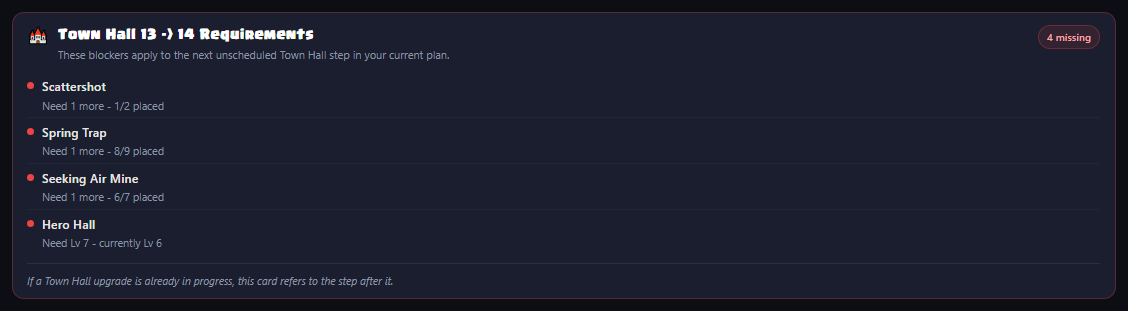
Clash Max Town Hall requirement card showing missing blockers
The warning area uses real requirement cards so you can see what is still missing before the next Town Hall step is legal.
Gold Storage icon

Storage caps

If an upgrade costs more than your current storage limit can hold, Clash Max flags it and can pull the matching storage upgrade forward when that unblocks something more important.


Barbarian King icon Archer Queen icon

Hero policy

Hero upgrades consume builders. If you set Clash Max to keep one or more heroes available, hero upgrades can wait even when they are legal and affordable.

Laboratory icon

Lab waiting

The lab can stay open on purpose if a stronger research path is about to unlock. That is different from the lab being forgotten.
Clan Castle icon

Placements and merges

Town Hall progression can require missing placements or merged defenses. Clash Max checks those before it treats the hall step as legal.

Variants

Clash Max ranks full schedules, not just the next upgrade

A plan can look good in the next hour and still be worse over the next few days. That is why the app can generate multiple full-timeline variants and rank them instead of pretending the first answer is the only answer.

Why Plan B Can Beat Plan A

The better schedule is the one that fits your goal and your timing better overall

Plan A 98.4% builder efficiency
Work 98.4% Idle 1.6%

Looks fine early, but carries a long Tuesday-night idle gap and reaches the stronger offense steps a little later.

Plan B 99.1% builder efficiency
Work 99.1% Idle 0.9%

Uses the same total time better, lands closer to your check-ins, and covers more of the priority work that matters inside the selected horizon.

These bars now match the actual uptime metric. Both plans can still look nearly full because builder efficiency is measured across the whole horizon, while a single badly placed overnight gap can still make one plan feel worse in practice.

Best Plan Ranking

What the ranking is really trying to optimize

  • The first question is whether a plan covers more of your chosen priority buckets within the current horizon.
  • After that, Clash Max uses tie-breakers like builder efficiency, total idle time, lab alignment, and amount of useful work scheduled.
  • Generate More Plans explores additional full schedules so you can compare stronger alternatives instead of trusting a single run blindly.
  • The result is still heuristic. Clash Max searches for very strong schedules, but it does not claim a mathematically perfect global best in every case.
What builder efficiency means: it is the share of builder time inside the selected horizon that ended up filled with active work. High is good, but a slightly lower-efficiency plan can still be better if it reaches the important buckets sooner or aligns the lab better.
Builder Base

Builder Base planning uses a different ruleset, a different output, and a different main goal

Clash Max does not treat Builder Base as "Home Village with different names." It switches to Builder Hall rules, Builder Base resources, Clock Tower timing, and the B.O.B. milestone model when that mode is active.
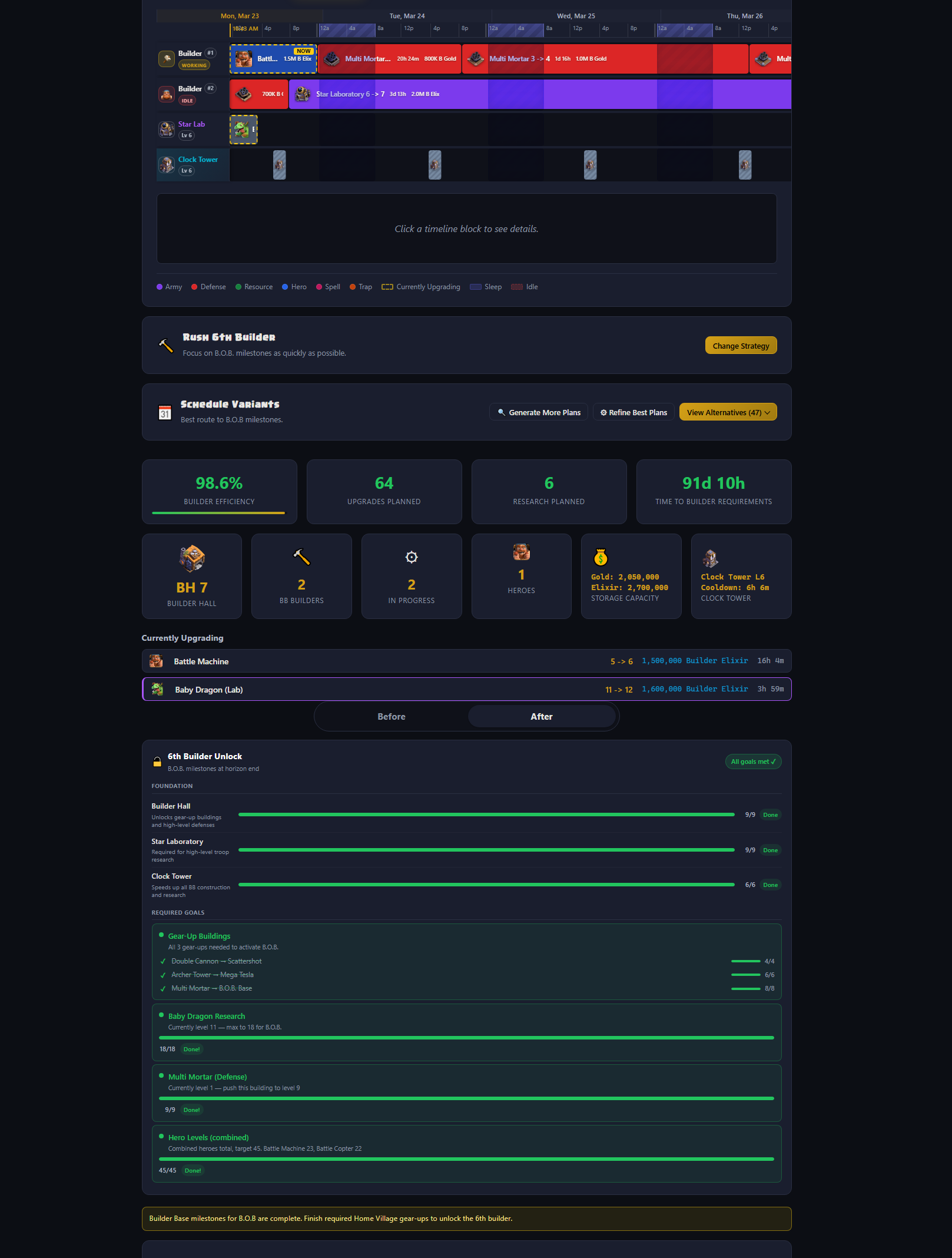

Real Clash Max Builder Base planner output showing Builder Base labels, stats, and timeline lanes
Builder Base has its own resources, warnings, results summary, and a Clock Tower-aware schedule.
Clash Max 6th Builder progress card collapsed in the Builder Base results area
Collapsed: the card stays tucked away by default, but the header still tells you whether the selected Builder Base plan is on track.
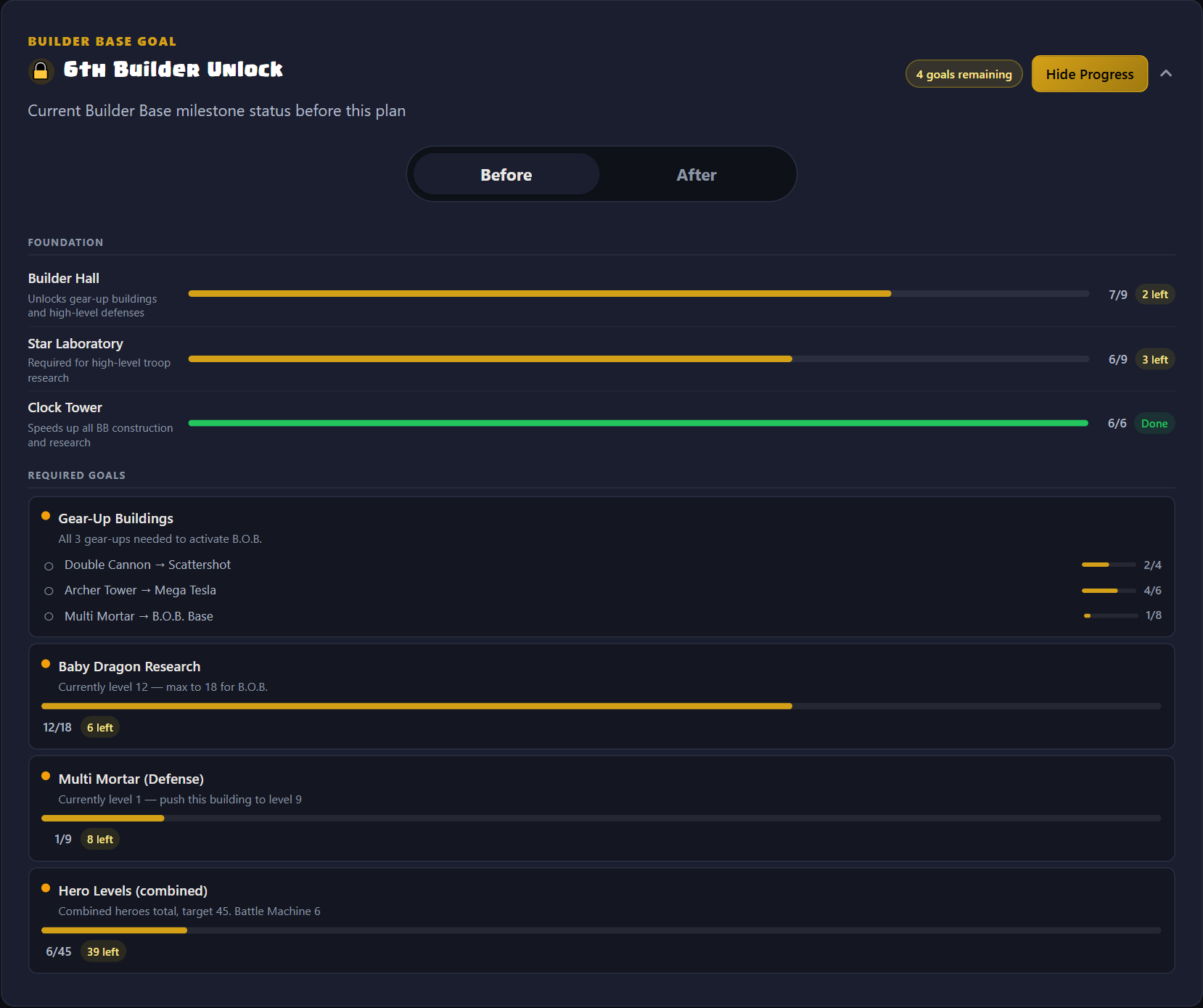
Clash Max 6th Builder progress card expanded on the Before view, showing current missing milestones
Before: open the card and switch to Before to see the current milestone gaps that still exist before the planned work is applied.
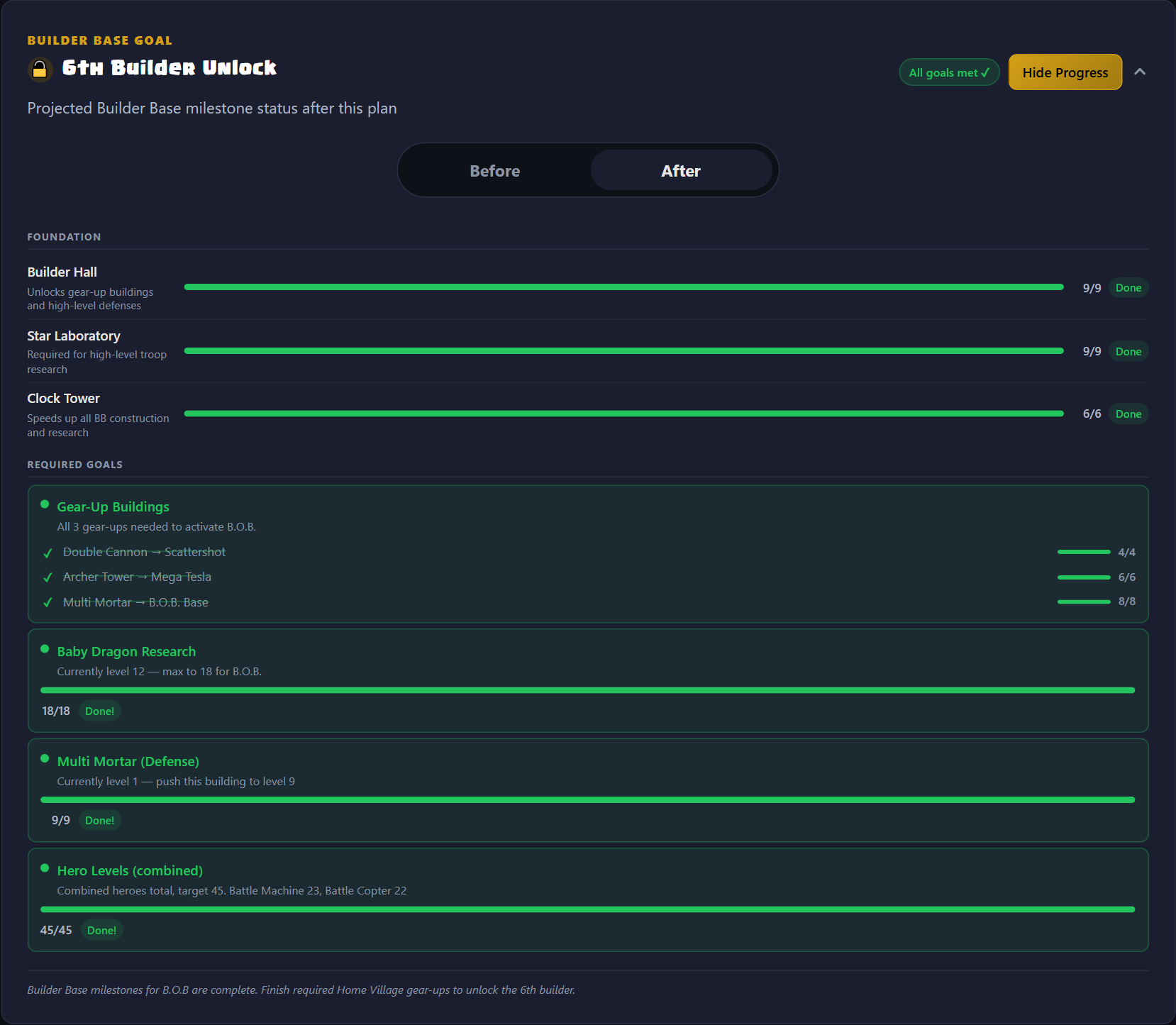
Clash Max 6th Builder progress card expanded on the After view, showing projected completion and the embedded Home Village note
After: switch back to After to compare what the selected plan finishes and see the embedded unlock note when only the Home Village gear-up side is left.
Data + Privacy

The planner is only useful if the facts are trustworthy and the data handling is clear

Clash Max is intentionally strict about where its planning data comes from and what happens when that data is missing. The app should not invent upgrade costs, durations, or requirements when the canonical data is not available.

Privacy

What stays local

  • Your pasted export, planner settings, cached data, and selected variant can be stored locally in the browser for convenience.
  • There is no scheduler backend receiving the village JSON you paste into the app.
  • If you copy or share something from the app, that is a user-initiated action rather than background syncing.
Accuracy

Where planning data comes from

  • Canonical static data is loaded from the local ClashKing mirror first, with the remote source used as a fallback.
  • If canonical data is unavailable, scheduling stops instead of fabricating approximate upgrade rows.
  • Storage capacity values still come from validated manual tables because ClashKing static data does not expose those capacities directly.
  • Research rows can use the checked-in research source of truth when that produces cleaner cost, time, and building-requirement mapping.
Limits

What Clash Max still cannot know

  • It can tell you a cost is blocked by storage capacity, but it does not predict your future farming income or loot timing.
  • Some temporary live modifiers still need manual input, including things like Gold Pass timing or other speed changes that are not guaranteed to exist in the export.
  • The search is heuristic. It explores many strong alternatives, but it does not promise the single best mathematically possible schedule in every edge case.
Deep Dive

Curious how the current build does the search?

Everything above is the player-facing explanation. This section is the implementation view: the actual forward simulation, scoring, search, and ranking rules the current build uses.

Open the implementation notes for the current build

The scheduling model

Home Village scheduling is a forward event simulation, not a backward solver. Each builder lane starts with a busyUntil timestamp seeded from the export. When the next builder frees up, the scheduler advances to the next real action time, filters the legal choices at that moment, assigns one, and then enqueues the follow-up level for that same building if another step exists.

  • Sleep, check interval, and wiggle room all shift the decision time before scoring begins.
  • Hero policy is enforced at pick time by counting how many hero upgrades are already active.
  • The lab runs as a separate lane in parallel, so builder choices do not directly block research.

Home-candidate scoring

Each building candidate starts with a small within-bucket priority based on how far below its current Town Hall cap it is, with extra nudges for early levels and army or hero categories. The larger signal is the rush bucket bonus.

composite = base priority + rush bucket bonus + timing heuristic + special unlock bonuses

  • One rush-order step is worth 90 points, so bucket order dominates ordinary tiebreakers.
  • If buckets share a custom tier, they inherit the same best bonus from that tier.
  • Once Town Hall is legal, the current build adds a very large ready-now bonus so the hall can jump to the top when the preset allows it.
  • Current TH blockers, next-TH blockers, merge-source prep, hero continuity, and manual auto-priority targets all add smaller targeted bonuses on top.

Timing heuristic

Beam search still needs a local timing signal when it scores individual candidates. Clash Max uses a utilization-first heuristic that prefers upgrades which keep builders working continuously, then blends in sleep alignment as a smaller tiebreak.

utilization = duration / (duration + idle until next decision)

  • The timing score blends about 80% utilization and 20% sleep-fit, then clamps the result to -1..1.
  • That timing value is deliberately small compared with rush-order steps, so your preset still drives the overall direction.
  • The effect is strongest when two legal upgrades live in the same bucket and one lands much closer to your next real check-in.

Constraint and unblock logic

The picker does more than ask whether an upgrade is legal right now. It also carries forward Town Hall requirements, merged-building source reservations, storage-capacity timelines, Hero Hall and Pet House gates, and lab-production requirements.

  • Storage upgrades can inherit priority from a blocked high-priority building or hero if that storage is the real reason the better move cannot start yet.
  • Laboratory upgrades can inherit priority from blocked tier-1 research if the missing lab level is what unlocks it.
  • Research also respects production-building unlocks like Barracks, Dark Barracks, Spell Factory, and Workshop, not just TH and lab level.

Lab-lane logic

The lab uses four tiers, either from the preset or from manual overrides. The scheduler first narrows to the best available tier, then uses within-tier priority and timing to decide which research starts next.

within a tier: priority * 1000 + timing * 5

  • That multiplier means tier and within-tier order stay dominant; timing is only a tiebreaker.
  • The lab can take a temporary filler job only if it does not delay a more important research choice past the allowed filler window.
  • The unlock check is based on the next real decision time, not just raw resource availability, so the lab respects the same sleep and check timing model as builders.

Variant generation

Every run starts with a deterministic baseline plan, then beam search keeps several promising early branches alive instead of collapsing immediately onto one greedy route.

  • Each beam pass traces the early builder decisions, preserves several semantically different paths, and then completes each surviving prefix into a full schedule.
  • Variants are deduplicated by a schedule fingerprint built from the non-existing builder and research tasks actually placed into the timeline.
  • Generate More Plans adds another beam pass so you can explore a wider set of early-path alternatives without rerunning the entire planner from scratch.
  • Heavy generation runs in a Web Worker so the UI can keep rendering while plans are being explored.

Refinement

Refine Selected Plan does not blindly rewrite the whole schedule. It targets a selected plan, destroys a small set of fixed decisions, and reruns only around those decisions to search for tighter timing.

  • The pass looks at visible idle blocks, ignores pure no_candidates dead ends, and picks from the worst idle pool first.
  • It destroys a small run of nearby builder decisions on the affected lane, keeps the rest of the plan fixed, and resimulates just that local region with a new seed.
  • The number of destroyed decisions and total rounds scales with horizon length, so short horizons get a tighter local search than very long ones.

How Home variants are ranked

Ranking is not just builder efficiency. The current build first measures whether a plan covers more of the important buckets inside the selected horizon, then looks at how early those buckets begin.

bucket contribution = bucket weight * hours until first start

  • Missing rush buckets are treated as if they started after a penalty window beyond the horizon, not as zero.
  • Lab tiers are scored similarly with weights 6 / 4 / 2 / 1 for tiers 1 / 2 / 3 / 4.
  • There are small early-start bonuses for touching top builder buckets in the first 48 hours and top lab work in the first 24 hours.
  • Final Home ordering is: coverage first, then objective timing, then lab timing, then efficiency, idle time, and total scheduled work.

Builder Base technical differences

Builder Base uses a separate engine. In B.O.B. rush mode, the candidate pool is intentionally narrowed to milestone work, and the schedule can be rerun up to four passes so Clock Tower boost windows settle into a stable pattern.

  • Clock Tower timing is modeled directly in task end times, not bolted on as a cosmetic note.
  • B.O.B completion is computed from Builder Hall, Clock Tower, Star Lab, the configured rush troop, gear-up milestones, hero total, and the defense-to-9 requirement.
  • Builder Base variants rank by earliest projected completion first; if none finish, the build falls back to milestone gaps, objective score, efficiency, and idle time.

Parser and data model notes

The export parser expands counted buildings into individual instances, turns active timers into seeded in-progress tasks, and keeps the game export semantics intact.

  • When timer exists, lvl is the current completed level and the active step is lvl + 1.
  • Walls are recognized in the import but excluded from timed builder scheduling because they do not occupy a builder lane.
  • Canonical upgrade rows come from the local ClashKing mirror first with remote fallback second, while storage capacities still come from validated manual tables because ClashKing does not expose them.
  • Research rows can use the checked-in research wiki source when that produces cleaner cost, time, and requirement mapping.
The short version: the search is intentionally heuristic. Clash Max spends its budget on legal, priority-aware, player-timed schedules that are strong enough to use in a browser, instead of trying to brute-force a global optimum that would be too slow to be practical.